
Print help · 21 October 2026 · Mockivation
How to print and assemble a desk sign
Print one piece, make three folds and secure a hidden tab. This guide follows the current His Kind printable desk sign, which forms a standing paper sign with a closed base.
Print, fold and tape: six steps
Choose the PDF that matches your paper
Unzip your purchased colour edition and open His-Kind-A4-Print.pdf for A4 paper, or His-Kind-US-Letter-Print.pdf for US Letter. Use a PDF viewer’s print dialogue. Both PDFs make the same finished sign; you only need to print one.
Print one-sided at 100% / Actual size
Select the matching paper size and turn off Fit, Shrink or Scale to fit. Print one-sided, with no pages-per-sheet arrangement or duplex printing. Use cardstock that your printer supports. If unsure about the settings, check them on a plain-paper copy before using cardstock.
Trim the solid outer rectangle
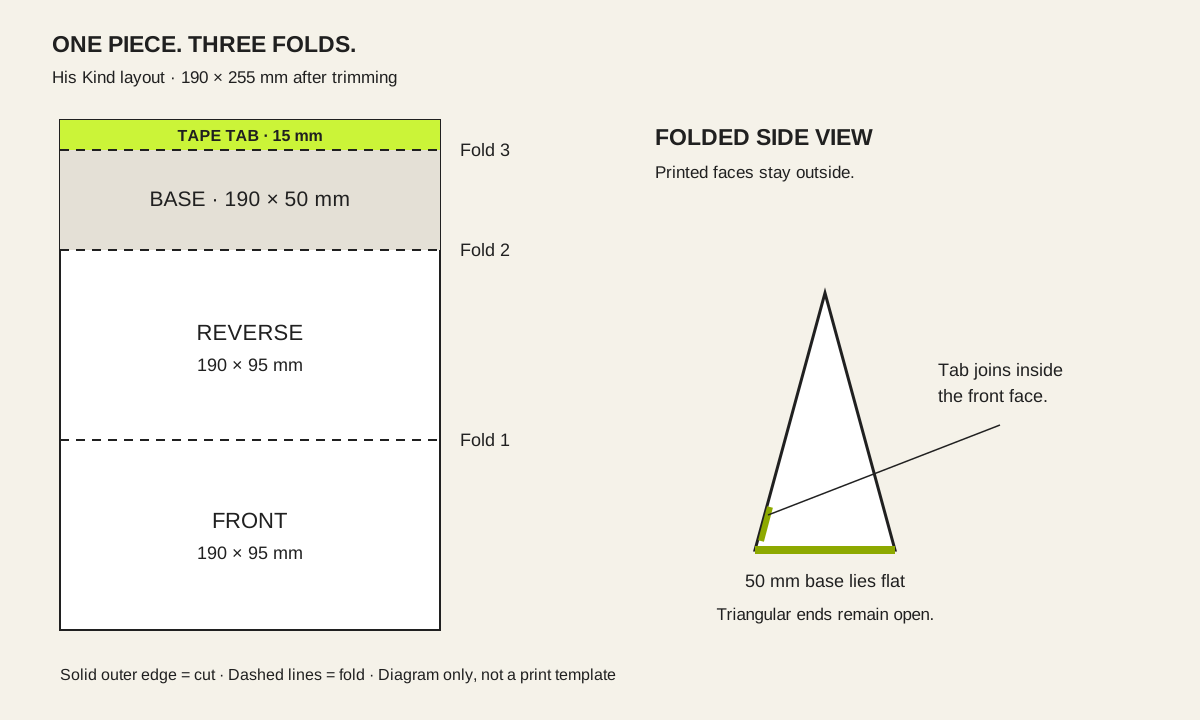
Cut around the outside edge and keep the entire layout as one piece. The trimmed piece should measure 190 × 255 mm. Do not cut the three dashed lines, remove the base or cut off the joining tab.
Crease the three numbered fold lines
Use a ruler to make straight creases at lines 1, 2 and 3. Bring the front and reverse into a triangular shape with the printed faces outside. Fold the base underneath. The reverse artwork is rotated in the flat PDF so it is upright after folding.
Tape the marked tab inside the front
Apply double-sided tape to the marked side of the 15 mm tab. Fold it inside and attach it to the blank lower inside of the front face. Align the ends before pressing the join. A glue stick is an alternative; hold the join and let it set before standing the sign.
Check the base and stand it up
The 190 × 50 mm base should sit flat, with the tab hidden inside. The two triangular ends stay open. If the sign leans, check the creases and alignment; if the base curls, check the paper and adhesive. Do not stretch the join to force the shape.
Paper, colour and print settings
Which paper should I use?
Use cardstock within your printer’s supported thickness and weight range. There is no single paper weight suitable for every home printer. A print shop can print your purchased file for personal use; ask for single-sided printing at 100%.
Why does Warm Off-White look white?
The background is unprinted. Warm-white cardstock creates the off-white appearance; white cardstock produces a white background. Original Lime uses a colour fill on both faces and uses more ink. Paper and printer settings affect colour; a home print will not reproduce fluorescent lime.
Why is the printed rectangle smaller?
Check that Actual size / 100% is selected and the PDF matches the loaded paper. Some print dialogues automatically shrink pages. Use the 190 × 255 mm trim measurement as a size check; do not enlarge the file to borderless mode.
Do I receive both colours?
One purchased unit includes the selected colour only: Warm Off-White or Original Lime. The ZIP includes both paper sizes for that colour, plus the instructions and licence. The artwork is finished, not an editable template.
The small print
Print the purchased edition for your own desk or give a finished sign as a personal gift. The licence does not allow file sharing, selling printed copies or print-on-demand reproduction. Read the licence inside your download.
If a supplied file is missing, incorrect or will not open, email know@mockivation.space with your order reference and a description of the problem.
View His Kind and its colour options →
For something to hand to a colleague, explore printable office humor cards. For ZIP access problems, read download help.